
CLI reference
Reference for every mcpwarp command, its flags, and what its exit codes mean.
Commands
Section titled “Commands”mcpwarp login
Section titled “mcpwarp login”Opens the browser for a device-flow login against the MCP Warp auth server. Stores credentials under ~/.mcpwarp/credentials/ (mode 0600).
--no-browser— print the URL and code instead of opening a browser.
mcpwarp logout
Section titled “mcpwarp logout”Removes stored credentials.
mcpwarp whoami
Section titled “mcpwarp whoami”Prints the logged-in user, the issuer, and the token expiry. With MCPWARP_TOKEN set it prints auth: using MCPWARP_TOKEN (personal access token).
--refresh— force a token refresh before printing.
mcpwarp status
Section titled “mcpwarp status”Validates your config and shows what mcpwarp sees, without starting the tunnel.
mcpwarp up
Section titled “mcpwarp up”Connects, registers every configured server, prints a table of names, kinds, and public URLs, and stays in the foreground until you press Ctrl+C. Re-registers automatically after a reconnect. If the auth server can’t be reached when the session token needs a refresh, it keeps retrying with backoff instead of exiting — see Troubleshooting.
You can run mcpwarp up on several machines under one account as long as each machine uses different server names. Run a given server name from one machine at a time: registering the same name from two machines is unsupported and the result is undefined. At most 10 mcpwarp up agents can be connected at once per account — see Limits and quotas.
NAME KIND URLblender stdio https://blender-anatoly.tunnel.mcpwarp.io/mcpnotes http https://notes-anatoly.tunnel.mcpwarp.io/mcpOn an interactive terminal (stdin and stdout both a TTY), up runs a full-screen TUI. Otherwise — or with --no-tui — it prints plain lines, which is what you want in scripts, services, or CI.
--no-tui— force plain line output even on a TTY.
On a TTY it looks like this:
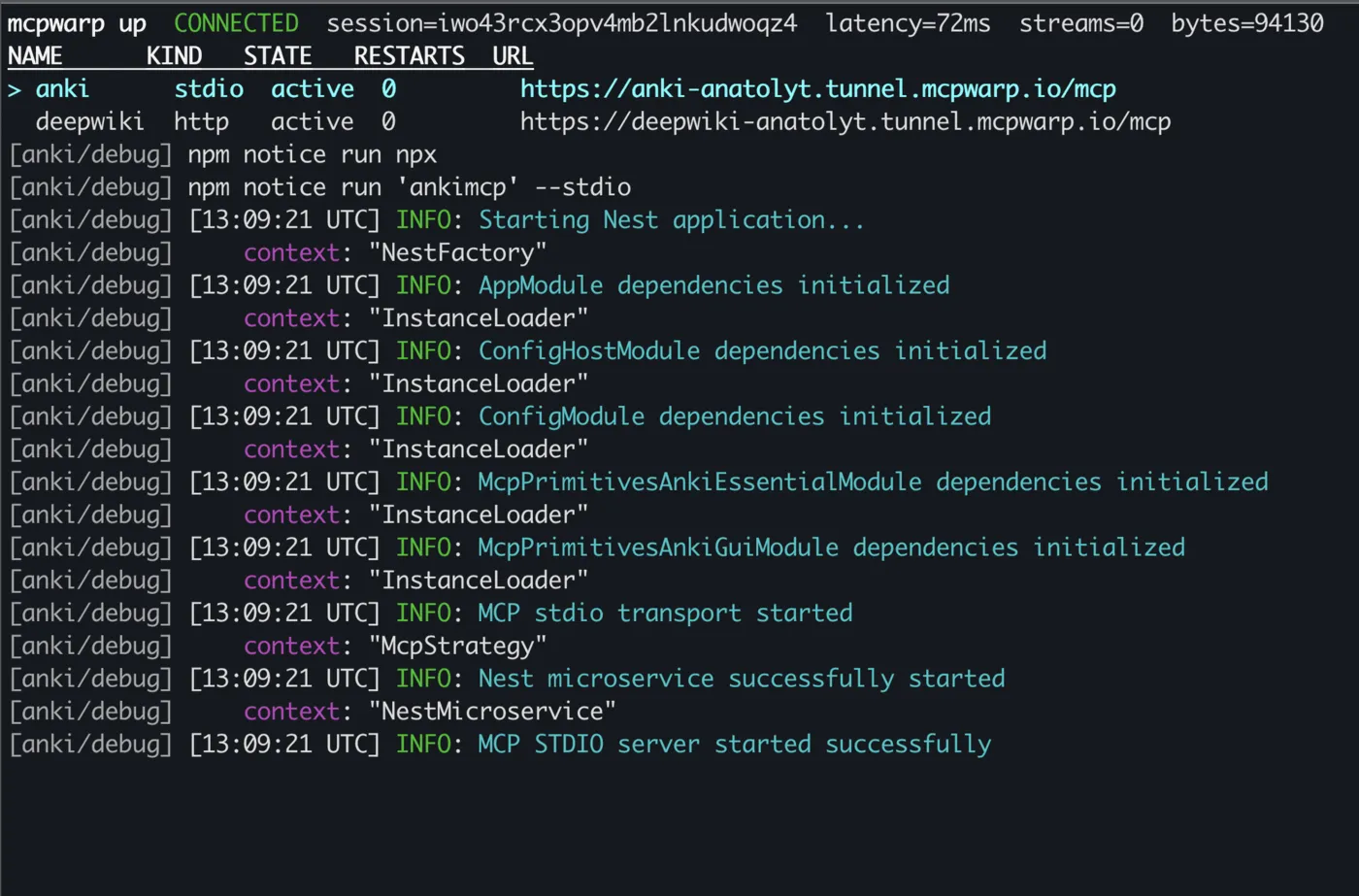
Quit with q or Ctrl-C; shutdown is graceful, bounded at 5 seconds, and a second Ctrl-C forces it.
TUI keys
Section titled “TUI keys”| Key | Action |
|---|---|
q / ctrl+c |
Quit |
? |
Help |
j/k or arrows |
Select a server |
l |
Toggle the log pane |
pgup/pgdn or ctrl+u/ctrl+d |
Scroll logs |
c |
Copy the selected server’s full public URL |
r |
Restart the selected server (stdio only) |
d |
Disable the selected server (stops the child, unregisters it) |
e |
Enable the selected server |
The footer shows q quit ? help ↑↓/jk select l logs c copy URL r restart d disable e enable.
c confirms with a short line such as copied https://notes-anatoly.tunnel.mcpwarp.io/mcp to clipboard; on a row with no URL it says nothing to copy: instead. It uses the native clipboard tool (pbcopy on macOS, clip.exe on Windows, wl-copy on Wayland, xclip or xsel on X11) and also sends OSC 52, which is what works over SSH. Inside tmux, OSC 52 needs set -g set-clipboard on in your tmux config.
Columns: NAME, KIND, STATE, RESTARTS, URL. A URL too wide for the terminal moves to its own line under the row instead of being cut off. A locally disabled server shows as absent — not paused — in the dashboard.
| State | Meaning |
|---|---|
pending |
Sent to the tunnel, waiting for it to confirm the registration. |
active |
Registered and has a public URL. |
rejected |
The tunnel refused the registration (QUOTA_EXCEEDED, CONFLICT, INVALID_NAME, USERNAME_REQUIRED, …). Shown in red, with no URL; the last error line above the table shows the reason and a hint (unless a later error has replaced it). |
disabled |
Disabled locally with d, or in the dashboard. |
restarting, failed, stopped |
stdio only: the local process’s state. |
http servers have no local process, so they only ever show the first four. A stdio server shows its process state while that’s unhealthy; once the process is healthy it shows its registration state instead. Fixing the cause of a rejected row alone (e.g. raising the quota) doesn’t re-register it: press e on the row, restart mcpwarp up, or wait for a reconnect. If the first register reply rejects every server, mcpwarp up exits with code 1 instead of showing rejected rows (unless every rejection is SERVER_DISABLED).
Pressing r on a stdio row restarts the child process and increments RESTARTS:

mcpwarp dashboard
Section titled “mcpwarp dashboard”Prints the dashboard URL, then opens it in your browser.
Global flags
Section titled “Global flags”--config <path>— path to the config file (default~/.mcpwarp/config.json).--issuer <url>— override the auth issuer URL.--connect-url <url>— override the tunnel connect URL.--verbose— verbose logging (never includes tokens).--version— print the CLI version.
Exit codes
Section titled “Exit codes”0— clean exit.1— runtime failure.2— bad usage or invalid config.130— interrupted (SIGINT).143— terminated (SIGTERM).
See Environment variables for the env var equivalents of --issuer and --connect-url, and Troubleshooting for what error messages mean.